
PRIVACY & COMPLIANCE
Powerful diagnostics. Zero personal data.
CartDoctor was designed from the ground up to diagnose checkout friction without ever knowing who your customers are. No names. No emails. No payment details. Just behavioural patterns that reveal what needs fixing.

Zero PII
COLLECTED

GDPR
READY

CCPA
COMPLIANT

CMP
INTEGRATED
DATA TRANSPARENCY
What we collect vs. what we never touch
CartDoctor captures behavioural signals that reveal checkout friction. It never reads, stores, or transmits any data that could identify a person.
What We Collect
You're running a WooCommerce store and you know checkout abandonment is costing you money. You just need someone to tell you exactly what to fix and in what order.

Which checkout fields cause friction (by field name, not field value)
How long customers spend on each field
Whether fields are filled, left empty, or corrected
Which field the customer was on when they left
Shipping method and payment method selected
Validation errors that appear during checkout
JavaScript errors on the checkout page
Network and API failures during checkout
Browser type, device type, screen size
Checkout type (Classic vs Block)
Traffic source (UTM parameters or referrer)
A random session hash (generated in-browser, not linked to any identity)
Agencies & Developers
You manage WooCommerce stores for clients and need a systematic way to audit checkouts, prioritise improvements, and prove your impact.

Audit any client's checkout in minutes, not hours
Generate data-backed improvement roadmaps
Prove ROI with before/after conversion tracking
Justify ongoing retainer fees with weekly reports
Credit card numbers, CVVs, expiry dates
Passwords or account credentials
IP addresses (anonymised before storage)
Cookies (session data uses sessionStorage, not cookies)
Any field value from PII-classified fields
TECHNICAL ARCHITECTURE
Four layers of PII protection
Privacy is not a configuration toggle in CartDoctor. It is enforced at every level of the data pipeline, from the moment data enters the tracker to the moment it reaches storage.

JavaScript Blocklist
The tracker maintains a hardcoded list of blocked fields (billing_first_name, billing_email, billing_phone, and more) and blocked input types (password, email, tel). Values from these fields are never read by the JavaScript tracker. Only metadata is captured: whether the field was filled or empty, how long the customer spent on it, and whether validation errors appeared.

PII Regex Stripping
All text strings processed by CartDoctor — error messages, product names, URLs, and any other free-text data — are run through regex patterns that detect and redact personal data. Email addresses become [email], phone numbers become [phone], and credit card patterns become [card]. This acts as a safety net even for data that should not contain PII.

Coupon Code Redaction
Coupon codes often contain personal identifiers — referral names, partner codes, or customer-specific strings. CartDoctor redacts all coupon codes to the first 3 characters followed by ***, preventing leakage of any personal or partner information through discount codes.

URL Query String Stripping
When CartDoctor logs network failures or API errors, it records the URL that failed — but all query string parameters are stripped before storage. This prevents personal data from leaking through URL parameters such as ?email= or ?customer_id= that some payment gateways and shipping APIs embed in their endpoints.
CONSENT MANAGEMENT
Two-tier tracking that respects every visitor's choice
CartDoctor adapts its tracking behaviour based on the consent your visitor has granted. When no consent is detected, it defaults to the most privacy-preserving mode automatically.
When analytics consent is granted
Rich diagnostic data captured for AI-powered analysis, with session continuity across page loads.
RECOVERY TOOLS HELP HERE
When no consent is detected (the default)
Aggregate metrics with zero device storage and zero identifiers. Each ping is completely independent.
When analytics consent is granted
Rich diagnostic data captured for AI-powered analysis, with session continuity across page loads.
Checks for the analytics/statistics consent category from your CMP
Falls back to stateless mode when no CMP is detected (safe default)
Supports runtime consent upgrades: if a visitor clicks "Accept" after page load, CartDoctor upgrades from stateless to full tracking automatically
Custom integration: set
window.cdConsentGranted = truefor any CMP not on the listComplete opt-out: use the
cartdoctor_disablefilter to disable everything including stateless mode
_all_tracking
Recommended Consent Plugins
CartDoctor integrates with popular consent management platforms. We recommend pairing CartDoctor with one of these trusted consent plugins to ensure full compliance.
Beginner-friendly with a generous free tier. A great starting point for stores that need a simple, effective consent banner without complex configuration.
Enterprise-grade consent management with automatic cookie scanning. Ideal for larger stores that need detailed compliance reporting and multi-language support.
WordPress-native and popular with WooCommerce stores. Offers deep integration with the WordPress ecosystem and region-specific compliance wizards.
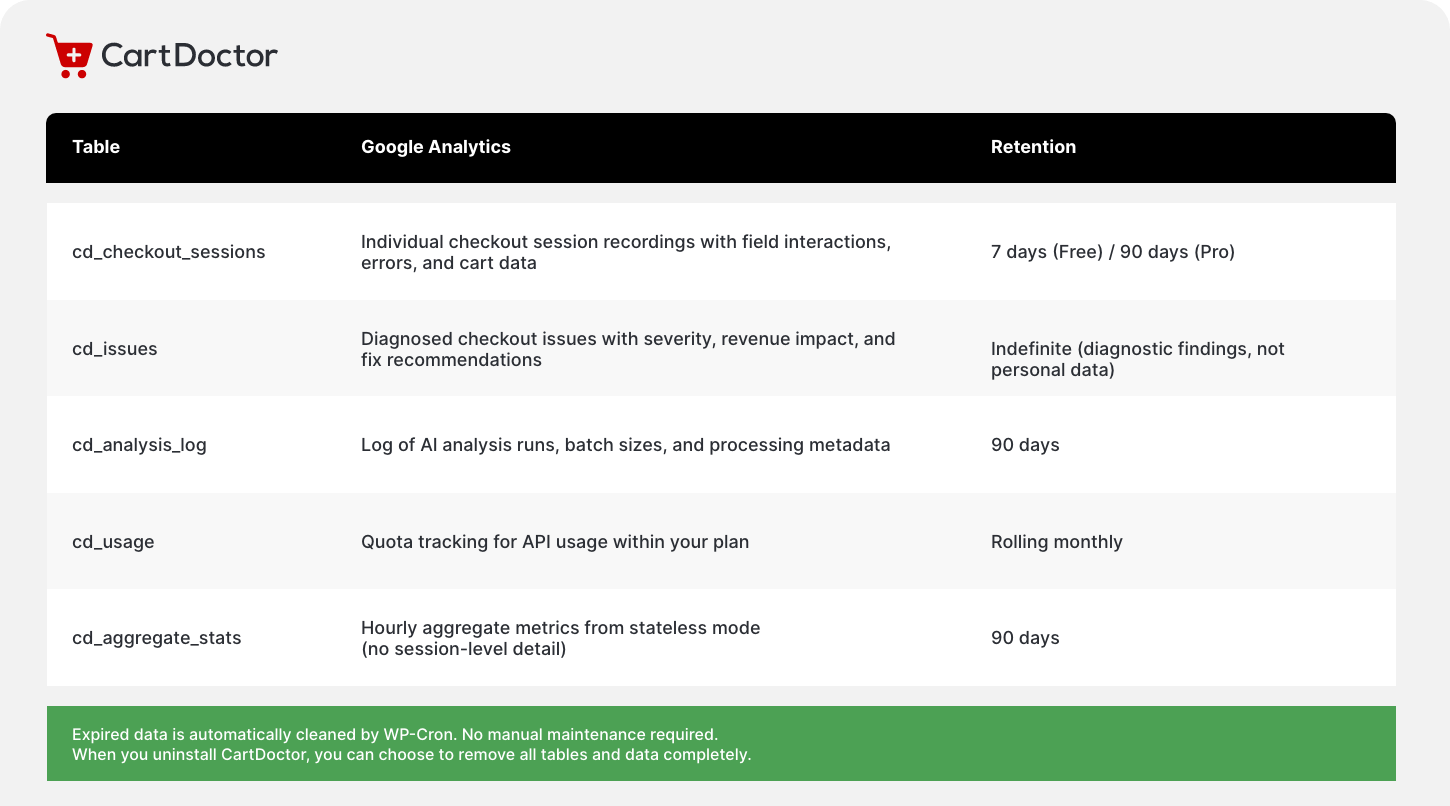
DATA STORAGE
Your data stays in your database
All session data is stored in your WordPress database. CartDoctor does not send data to external storage or third-party analytics platforms.
AI ANALYSIS PIPELINE
How your data reaches the AI (and what it never sees)
Session data is processed server-to-server. The AI receives behavioural patterns only. No personal data ever reaches the analysis endpoint.

Session Data
Behavioural patterns collected in your WordPress database. All PII already stripped by the four protection layers.
HMAC Signing
Your server signs the request with HMAC-SHA256. The proxy validates the signature before processing. No unsigned requests accepted.

Server-to-Server
Data sent via PHP wp_remote_post from your server to the analysis endpoint. Never browser-to-server. Never exposed to the client.

AI Diagnosis
AI analyses behavioural patterns and returns structured issue objects: severity, impact, affected sessions, and fix recommendations. No PII returned.
WORDPRESS INTEGRATION
Built into WordPress privacy tools
CartDoctor integrates with the privacy tools that WordPress provides out of the box, accessible from Tools > Privacy in your admin dashboard.

Privacy Policy Suggestion
CartDoctor adds suggested privacy policy text via wp_add_privacy. Copy it directly into your store's privacy policy page with one click.
_policy_content()

Personal Data Exporter
Responds to WordPress personal data export requests by searching for checkout sessions linked to an email address through WooCommerce orders.

Personal Data Eraser
Responds to WordPress personal data erasure requests by deleting any checkout sessions linked to an email address through WooCommerce orders.
INTERNATIONAL COMPLIANCE
Designed for compliance worldwide
CartDoctor's zero-PII architecture makes compliance straightforward regardless of where your store or your customers are located.

GDPR
Supports lawful basis of legitimate interest for behavioural analytics used for service improvement. Consent mode is available for stores requiring explicit opt-in. Data minimisation is enforced by design — CartDoctor collects only what is needed for checkout diagnostics. Right to access and right to erasure are supported through WordPress privacy tools.

CCPA
No personal information is sold. No personal information is shared with third parties for cross-context behavioural advertising. CartDoctor's zero-PII design means there is no personal information to sell or share in the first place.
ePrivacy/Cookie Law
Stateless mode requires no cookies at all. Full tracking mode uses sessionStorage (same-tab, same-session) which most legal interpretations do not classify as a "cookie" — but CartDoctor integrates with consent banners regardless, so your store is covered either way.
LGPD, POPIA, PDPA
CartDoctor's zero-PII design means compliance is straightforward in all jurisdictions. When no personally identifiable data is collected, the regulatory burden is minimal regardless of the framework your store must comply with.
DEVELOPER CONTROLS
Filter hooks for full control
Developers and agencies can fine-tune CartDoctor's tracking behaviour using WordPress filter hooks. No settings page needed — drop these into your theme or a custom plugin.
cartdoctor_disable
_all_tracking
Return true to disable all tracking completely, including stateless mode. No JavaScript is enqueued, no pings are sent, no data is recorded. Use this for environments where tracking should never run.
CCPA
Return false to force stateless-only mode regardless of consent status. Full session tracking will not activate even if the visitor grants analytics consent. Useful for stores that want aggregate metrics only.
ePrivacy/Cookie Law
Override the detected client IP address. Use this for custom proxy, CDN, or load balancer setups where the standard IP detection headers do not return the correct visitor IP.
LGPD, POPIA, PDPA
Filter the array of WordPress user roles excluded from tracking. By default, administrators and shop managers are excluded so their activity does not skew checkout diagnostics.
AU version only