
SESSION TRACKING
Four tracking subsystems. Zero personal data.
CartDoctor captures everything happening during a checkout session — interactions, cart contents, errors, and page structure — without ever recording who the customer is.

Click & Interaction Tracking
Monitors how customers interact with every field and element on your checkout page.

Field focus and blur events with timestamps
Products, quantities, and liTime spent per field (hesitation detection)ne-item prices
Input corrections and re-entries
Exit field detection (last field before abandonment)
Payment method and shipping option changes

Cart Snapshot Capture
Records the full cart context at the moment of checkout — sanitized and anonymized.
Products, quantities, and line-item prices
Shipping methods and calculated costs
Applied coupons and discount values
Cart total and subtotals
All values sanitized before storage

Network & Error Monitoring
Catches the invisible errors that silently break your checkout experience.
JavaScript errors and console exceptions
Failed AJAX and API calls
Payment gateway communication failures
Products, quanTimeout and network connectivity issuestities, and line-item prices
Error frequency and correlation with abandonment

DOM Observation
Monitors how customers interact with every field and element on your checkout page.
Validation error messages and their triggers
Checkout type detection (Classic vs Block)
Installed plugin signatures and injected elements
Form field structure and required fields
Dynamic content changes during checkout

Privacy
by design.
CartDoctor never captures field values for PII fields — no names, email addresses, phone numbers, physical addresses, or payment details. It only tracks whether a field is filled, how long it takes, and whether it produces an error. Your customers remain completely anonymous. For full cookie consent management on your store, we recommend pairing CartDoctor with a dedicated consent plugin such as CookieYes, CookieBot, or Complianz.
AI ANALYSIS ENGINE

Your sessions go in. Actionable iagnostics come out.
CartDoctor batches your session data, sends it through a secure AI pipeline, and returns structured issues with severity ratings, revenue impact estimates, and specific fix recommendations. Available on the Pro plan ($500/month).

Sessions Collected
Interactions, errors, and cart data captured silently

Daily Batch via WP-Cron
Minimum 10 sessions required before analysis runs

HMAC-Authenticated Proxy
Data sent to secure endpoint, never exposed to third parties

Click & Interaction Tracking
Structured issues returned with fixes and revenue impact
What the AI receives
Interactions, errors, and cart data captured silently.
Validation error messages and their triggers
Checkout type detection (Classic vs Block)
Installed plugin signatures and injected elements
Form field structure and required fields
Dynamic content changes during checkout
What the AI returns
Each diagnostic comes back as a structured, actionable issue.
Severity level: critical, moderate, or low
Issue category and descriptive title
Detailed description of the problem
Specific fix recommendation
Confidence score and estimated weekly revenue impact
ISSUE MANAGEMENT
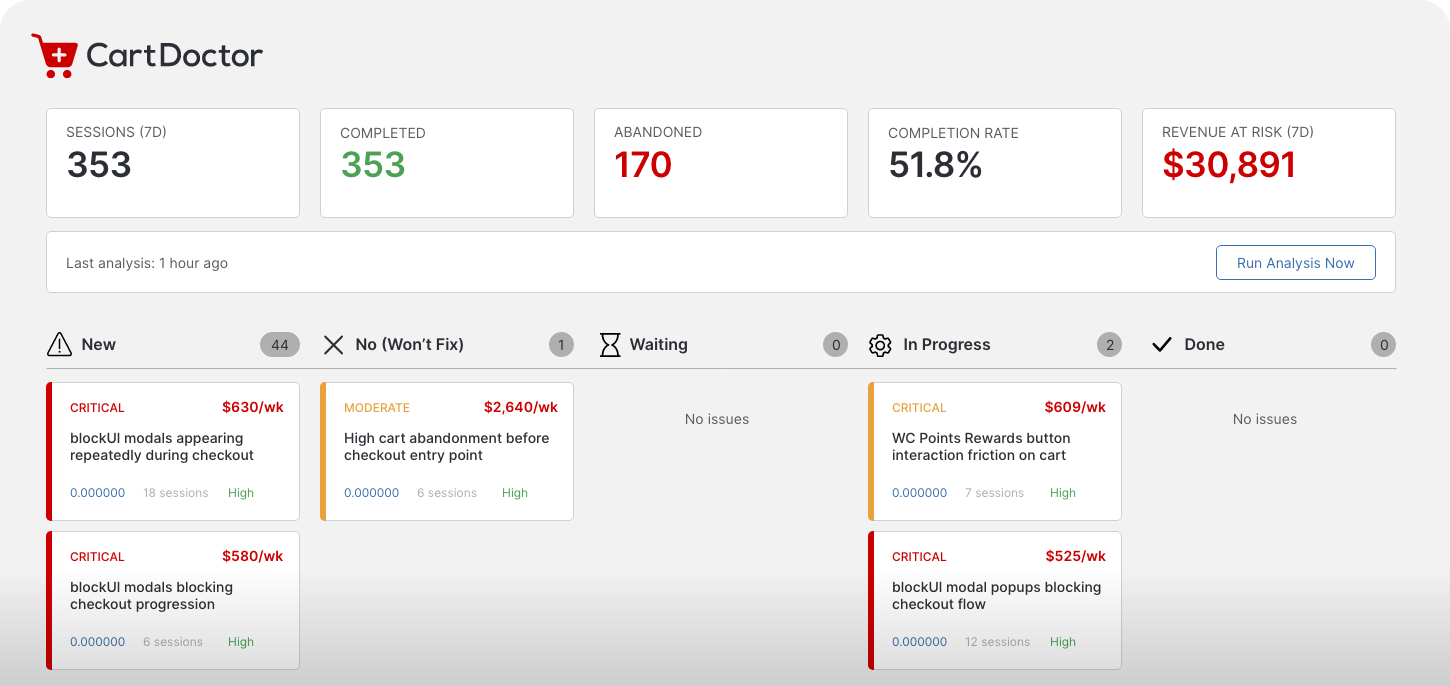
A Kanban board built for checkout fixes
Every issue the AI surfaces lands on a drag-and-drop board. Triage, prioritize, and track your fixes like a development team — all from inside your WordPress dashboard.
CONVERSION IMPACT TRACKING
Prove that your fixes are actually working
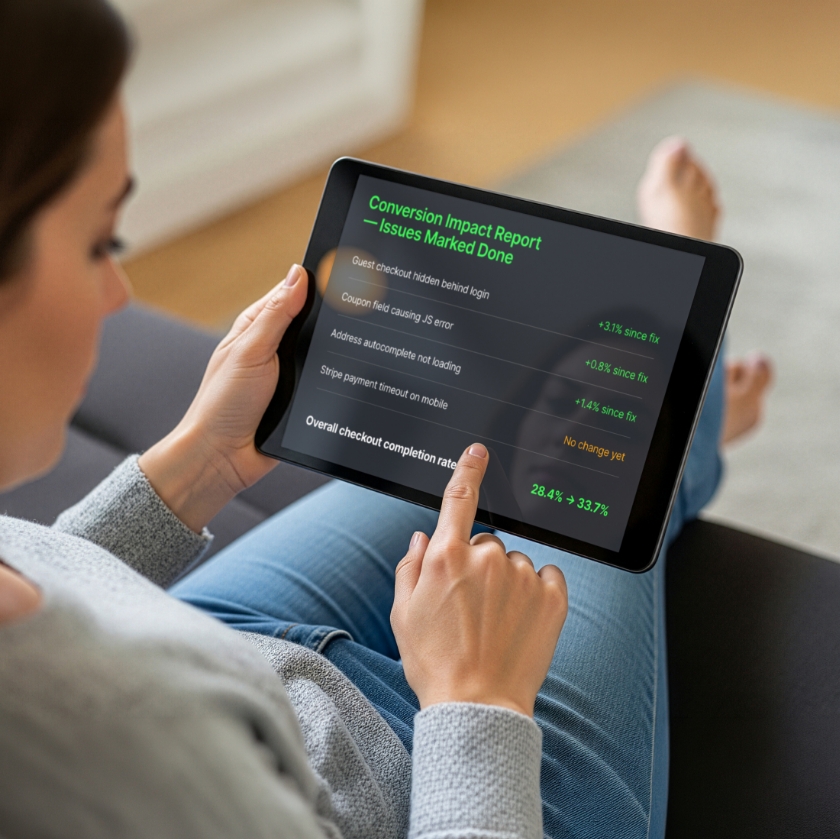
Most optimization tools tell you what to fix. CartDoctor tells you whether the fix worked. That is the difference between guessing and knowing.
Baseline capture:
when you move an issue to “Done,” CartDoctor records your current checkout completion rate at that moment
Weekly comparison:
each week, CartDoctor compares your new completion rate to the baseline from before the fix
Email digests:
see the delta delivered straight to your inbox — “+2.3% since fix” or “No change yet (may need more time)”
Proof of impact:
show clients, stakeholders, or yourself that the work you did had a measurable effect on revenue
EMAIL DIGEST REPORTS
Your checkout health, delivered to your inbox
Both plans include a weekly email. The Free plan delivers key stats, while Pro adds AI-detected issues, fix recommendations, and conversion impact tracking.
Weekly stats email (Free):
sessions, completions, abandonments, completion rate, and revenue at risk
Top issues (Pro):
severity level, estimated weekly revenue loss, and the AI’s fix recommendation for each
Fix impact tracking (Pro):
conversion rate deltas for every issue you have marked as Done
Configurable recipient:
send to yourself, your developer, your client, or an agency team inbox
Always-on monitoring:
even if you never open the WordPress dashboard, you will still know what is happening with your checkout

PLUGIN DETECTION & AWARENESS
CartDoctor knows what plugins are running on your checkout
Both server-side and client-side detection ensure the AI has full context about your checkout stack — so it can pinpoint which plugin is causing which problem.

Server-Side Detection
Detects 20+ checkout-related plugins by checking for known PHP classes during WP init. Identifies payment gateways, shipping calculators, address validators, checkout redesigns, anti-fraud tools, and coupon plugins.
WooCommerce Stripe
WooCommerce PayPal
Afterpay
WooCommerce Shipping
Table Rate Shipping
AutomateWoo
WooCommerce Anti-Fraud
Smart Coupons
CheckoutWC
Fluid Checkout
CartFlows
FuneiKit

Client-Side Detection
Scans the checkout page DOM for signatures of popular plugins that inject frontend elements. Detects UI modifications, payment widgets, address lookup tools, and security layers.
CheckoutWC
Fluid Checkout
CartFlows
FunnelKit
AddressFinder
Afterpay Widget
Stripe Elements
PayPal Buttons
reCAPTCHA
Context-aware AI
recommendations.
Plugin detection data is included in every analysis batch. Instead of generic advice, the AI knows that your Stripe Elements widget is timing out, or that your Fluid Checkout layout is hiding the coupon field. Recommendations are specific to your stack.
WOOCOMMERCE CONFIGURATION CONTEXT
Recommendations specific to
YOUR store’s setup
CartDoctor automatically reads your WooCommerce settings and sends them to the AI alongside session data.
The result: every recommendation accounts for how your store is actually configured.








All configuration data is detected automatically — no manual setup required.
The AI uses this context to avoid recommending changes that conflict with your existing settings.
USAGE METERING
Unlimited tracking.
No surprise charges.
CartDoctor automatically reads your WooCommerce settings and sends them to the AI alongside session data.
The result: every recommendation accounts for how your store is actually configured.
Unlimited
- Unlimited checkout session tracking
- Dashboard stats: sessions, completions, abandonments, rate, revenue at risk
- Weekly stats email
- Plugin detection
- Consent management
Unlimited
- Everything in Free
- AI diagnostics and issue detection
- Fix recommendations and revenue impact scoring
- Kanban board for issue management
- Conversion tracking
- Detailed weekly email with issues
Your dashboard shows total sessions tracked and days actively monitored this month.